Interview with Daniel Anderson: Using Teams & SharePoint to Run Knowledge Sharing Sessions Turning Knowledge into Assets

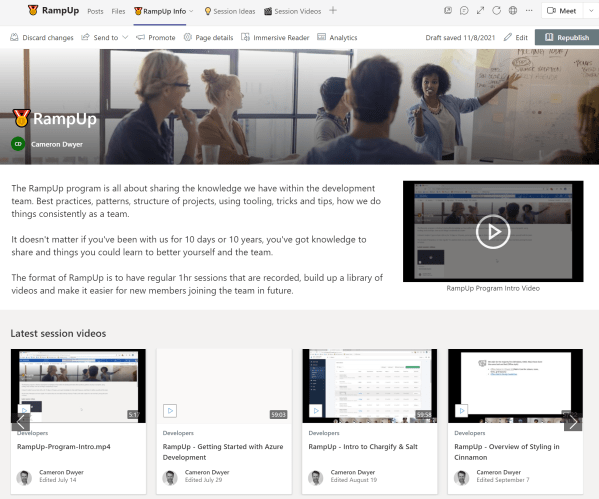
In the days before we closed out 2021 I caught up with Daniel Anderson for a podcast where we discussed how (and why) I used Microsoft Teams and SharePoint to run regular knowledge sharing sessions within our company. With zero development you too can use your Microsoft 365 tenant to achieve the same outcome for... Continue Reading →

4 tips for writing well structured & simple to navigate Microsoft Word documents

It struck me recently when collaborating on documents that we all go about creating documents differently and there's some great time saving features Word has to make navigating and restructuring your document fast and simple that you might be missing out on. Often when I start writing a document I try to break the document... Continue Reading →

How to Setup Teams & Microsoft 365 for Streamlined Knowledge Sharing Sessions (aka Lunch & Learn or Brown Bag)

Knowledge Sharing Sessions If you've found this article then you are probably familiar with the term Brown Bag sessions (or one of the other creative names used for these types of meetings). Typically these are small group, informal training and learning sessions where each session focuses on a particular topic with the aim to share... Continue Reading →

How to use the Microsoft Graph SDK Chaos Handler to Simulate Graph API Errors

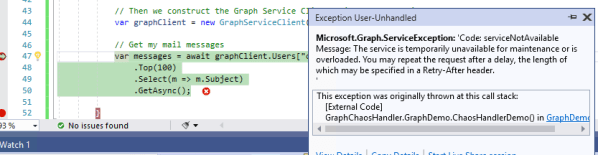
So you've developed your application using the Microsoft Graph SDK, you are making calls to the Graph API and things are looking great. Being an awesome developer, you want to make sure that your application can handle any errors that the Graph API might throw at you. The first challenge is trying to figure out... Continue Reading →

Simulating 429 Throttling in Microsoft Graph API (SharePoint/OneDrive workloads)

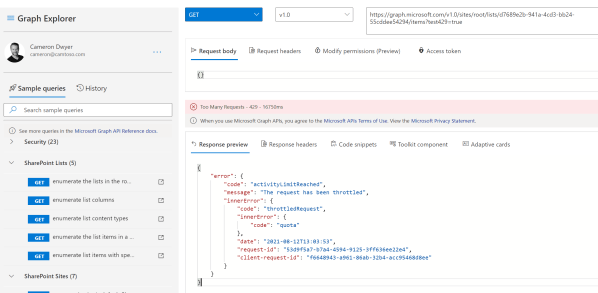
Developing and testing your error handling code is really important to ensure the end product is resilient. I've always found this area to be a bit of a minefield when developing against SharePoint and more recently the Microsoft Graph API. I usually resort to using some software that intercepts the calls being made (e.g. Fiddler)... Continue Reading →

Simplify taking meeting notes using native OneNote/Outlook integration

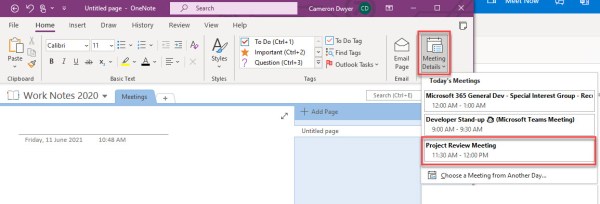
This isn't new functionality of OneNote/Outlook but I've just re-discovered it. I'd been using the 'modern' OneNote (Win 10 App that you could get from Windows Store). This once represented the future of OneNote until Microsoft changed direction and re-stated that future investment would be in the original desktop version of OneNote. I've now taken... Continue Reading →

Talking Office Add-in Development and DevOps on the Microsoft 365 Developer Podcast

I'm a regular listener of the Microsoft 365 Developer Podcast as I find it a great way (and efficient way) to stay across the news and what's happening in this space. My tips as to other ways I keep up to date on the latest news Having listened to the show for so long I... Continue Reading →

Microsoft Graph Learn Together Event – Join Our APAC Watch Party

What is this event? The Microsoft Graph team (the people that actually make the Graph API) are running a 2hr live streamed event on Learn TV targeted at developers wanting to learn how to build apps using the Microsoft Graph and expedite their journey. Microsoft is running this live stream twice to accommodate different time... Continue Reading →

Outlook Add-in Roaming Settings Behaviour and Shared Mailboxes

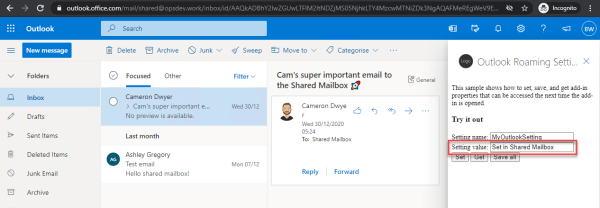
Roaming Settings are a feature of the Office Add-in Model (Office.js) and provide a persisted storage object that your add-in can use. The Office Add-in model takes care of storing the settings and making them available as users move onto different devices or different hosts (Desktop Outlook vs Web Browser for example). This works as... Continue Reading →

Create a website or blog at WordPress.com

Up ↑