14 October 2025 is a big day when it comes to the Microsoft Office Add-ins world. It marks not only the official retirement of Windows 10, but also the end of support on by Microsoft on various other Office related products including Office 2016, Office 2019, Exchange Server 2016, Exchange Server 2019. Here's many of... Continue Reading →
New Outlook – Official Resources and Links
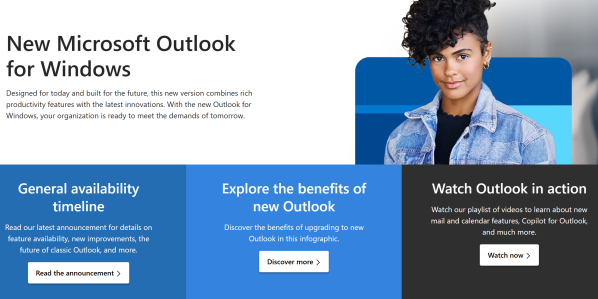
Now that New Outlook for Windows has gone into Generally Availability (1 Aug 2024) Microsoft have provided new and updated material to assist in many areas of planning and migrating users, here's a roundup of the some really useful links to official Microsoft guides and documentation. Migration Kit- Migration Guide- Frequently Asked Questions (FAQ)- Sample... Continue Reading →
How to control/block/prevent usage of New Outlook for Windows
Now that New Outlook for Windows has gone into General Availability many organisations will be looking at how they will evaluate and control the deployment/migration of users from Classic Outlook to New Outlook. Some new resources have been made available to help here: Plan your migration to new Outlook for Windows Microsoft has provided several... Continue Reading →
New Outlook for Windows is Generally Available (now a supported MS product)
Microsoft reached the General Availability (GA) milestone for New Outlook for Windows on 1 August 2024. Moving a product from Preview to General Availability means a few things in the eyes of Microsoft: Microsoft does not recommend Preview products for production use, but once it goes GA that is Microsoft saying it is now ready... Continue Reading →
New Outlook for Windows – Deployment Timeline and Considerations
The purpose of this article is to clarify the changes being made to Outlook for users on Windows and what we can expect to see as these changes progress. Firstly let's do a quick lap around the different Microsoft Mail clients on Windows. Mail & Calendar App This is the free Mail & Calendar App... Continue Reading →
Changes to how you sideload an Outlook add-in manifest (as of Sep 2023)
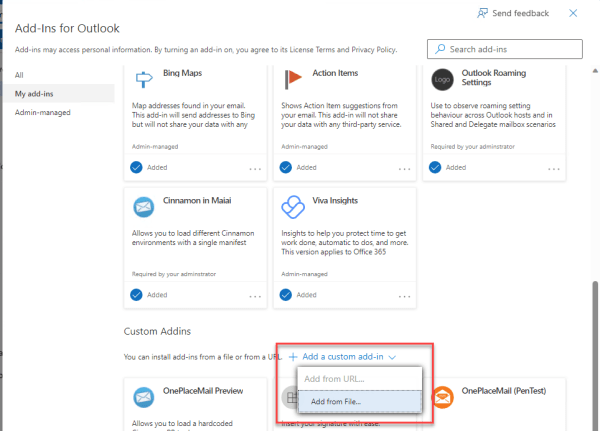
What is sideloading an Outlook add-in? This is the process of installing a modern web-based add-in directly from an add-in manifest file rather than from the store (AppSource). Sideloading is a common practice for developers during the development and testing of their add-in. It can also be used for Enterprise applications which are developed in-house... Continue Reading →
Microsoft Graph API – Inconsistent support for User Id, UPN and SMTP address to identify users
When making calls to get user centric data from the Microsoft Graph API the documentation tells us we can use either the users (Graph) id or the users UPN (Active Directory User Principal Name) For example, to get the details of a specific user GET /users/{id|userPrincipalName} To get mail messages for a specific user GET... Continue Reading →
Developer Sessions at Microsoft 365 Virtual Marathon Conference
I'll be giving two developer oriented sessions at the free Microsoft 365 Virtual Marathon conference May 4-6 2022. Microsoft 365 Virtual Marathon is a free, online, 60-hour event happening May 4-6, 2022. We will have content going the whole time with speakers from around the globe. This event is free for all wanting to attend.... Continue Reading →
Simplify taking meeting notes using native OneNote/Outlook integration
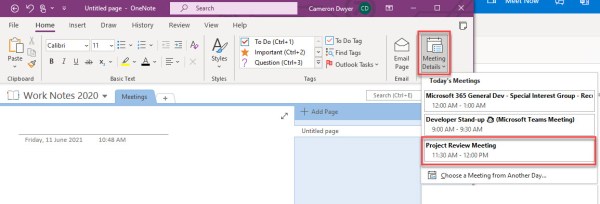
This isn't new functionality of OneNote/Outlook but I've just re-discovered it. I'd been using the 'modern' OneNote (Win 10 App that you could get from Windows Store). This once represented the future of OneNote until Microsoft changed direction and re-stated that future investment would be in the original desktop version of OneNote. I've now taken... Continue Reading →
Outlook Add-in Roaming Settings Behaviour and Shared Mailboxes
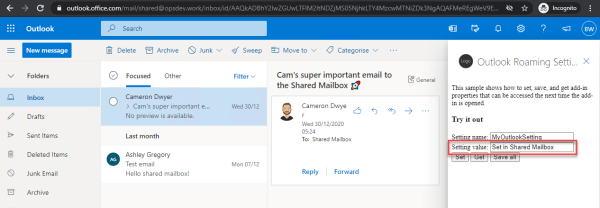
Roaming Settings are a feature of the Office Add-in Model (Office.js) and provide a persisted storage object that your add-in can use. The Office Add-in model takes care of storing the settings and making them available as users move onto different devices or different hosts (Desktop Outlook vs Web Browser for example). This works as... Continue Reading →