How to create a Microsoft Teams Messaging Extension pop-up dialog with a custom UI
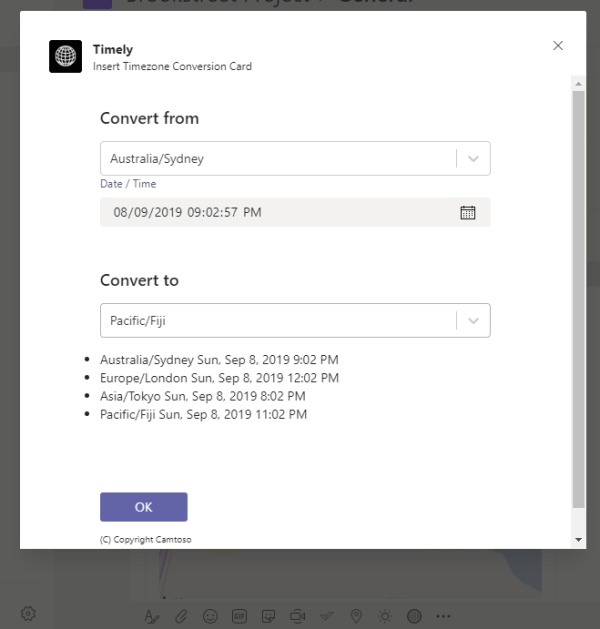
Messaging Extensions in Microsoft Teams allow you to pull in data from other systems and insert into the new message the user is composing. This can be an incredible time saver for users and results in consistent and accurate data in the form of a card being inserted into the message. Most of the documentation... Continue Reading →

This is what I heard at DWC Australia 2019 + all the photos!

What a great conference bringing the Office 365 community together. I really look forward to this event each year. For me, its a great time to take a moment away from the office and listen. Its very easy to get caught up in the day to day of our busy jobs. I do my best... Continue Reading →

Digital Workplace Conference Sydney – My Top Picks

The Digital Workplace Conference is set to hit Sydney next week and is in it's 10th year! This conference has a rich history in the SharePoint community in Australia and New Zealand, and in recent years has grown into an all up Office 365/Azure conference with a focus on getting the most out of the... Continue Reading →

Why I believe Office Add-ins are the underrated productivity enabler

We are living through the age of digital transformation, where businesses are finding new and novel ways to embrace technology to change processes and gain competitive advantages. This has seen almost all of our once paper based documentation make it's way into digital form. The core Office product suite of Word, Excel, PowerPoint and Outlook... Continue Reading →

🏆 #14 Top SharePoint blog to follow in 2019 is camerondwyer.com

I stumbled across this list of SharePoint blogs to follow in 2019. You never know the metrics used or logic behind these lists but I'm honoured to have this blog site listed at number 14! Not quite sure I how I ended up that high on the list. For those reading this you probably already... Continue Reading →

How to easily select overlapping or hidden images in PowerPoint slides

When creating more complex PowerPoint slides you may need to overlap objects or entirely cover object with others. This can make objects very hard to select as they are underneath each other. There is an easier way than just clicking with increasing frustration! Home | Drawing | Arrange | Position Objects | Selection Pane... Now... Continue Reading →

Microsoft Graph Security Hackathon

Microsoft has been building out its 'cloud first' strategy for many years now. As once separate on-premises server products have morphed into online services, we have been reaping the benefit of tighter integration between these services products. We've seen this most strongly with the Office 365 services where SharePoint, Office (Word, Excel, PowerPoint, Outlook, OneNote),... Continue Reading →

What are Microsoft Teams Messaging Extensions and why you should consider building one

It's no secret that I think Microsoft Teams is an awesome product. I've written in the past about how I believe Teams is a great enabler for making people more productive and brings the right tools together in a place that makes a lot of sense. What are messaging extensions? Message extensions are available when... Continue Reading →

Do you hit ENTER in Microsoft Teams for a new line and accidentally post partial messages? Try this hack

Me too! I have been doing it regularly. I'm moving between applications and my brain just fails to switch to "Teams" mode and remember that I've got to hit SHIFT+ENTER to get a new line. This leaves me frustrated with posting partial messages (or messages I wish hadn't been sent as I wasn't finished). Frustrated... Continue Reading →

THE place to start for Microsoft Teams implementation – Adoption Guide (Flipbook)

Microsoft Teams is the hub for teamwork in Office 365. The vision Microsoft has with Teams, of bringing existing products and services together into a central hub and minimising context switching, is a vision I share in and have been fostering for over a decade. Before Teams came along I'd spent over a decade of... Continue Reading →

Create a website or blog at WordPress.com

Up ↑