Streamline development tasks using personalised Custom Modes in Cursor
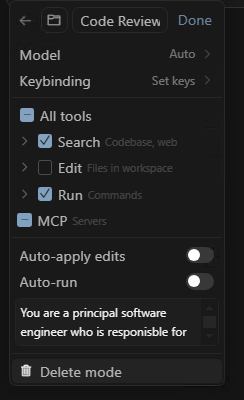
Do you have a bank of prompts you copy/paste into the Cursor chat when you want to achieve a specific task? Maybe it's when you want to do a code review, maybe it's when you want it to write unit tests for some new code, maybe it's when you what it to add OpenAPI specification... Continue Reading →

Microsoft 365 Developer Podcast: OnePlace Solutions ISV Showcase

I was recently interview by Microsoft's Ayca Bas on this podcast of the Microsoft 365 Developer Podcast series where Ayca, Jeremy and Paul talk to developers who are building awesome solutions on Microsoft 365. In this episode, I had a chance to talk about how OnePlace Solutions started as a small company in Australia and... Continue Reading →

How we built the OnePlaceMail Outlook App on the Microsoft 365 Platform & Azure Cloud

In this episode of the Microsoft "Learn from the Community" series with Ayca Bas, Mathieu Rebuffet and myself discuss our career paths that led us to developing and running commercial products at scale on top of the Microsoft 365 platform and leveraging the Microsoft Azure cloud. We demonstrate some key features of the OnePlaceMail App... Continue Reading →

Hosting a Single Page Application (SPA) from Azure Blob Storage that supports deep links

Using Azure Blob storage to host static website files has been around for many years, it's cheap, effective and fast to setup. It gives you the ability to effectively create a directory with a unique public URL that you can upload your static files to and have them hosted (no need for any web server).... Continue Reading →

Developer Sessions at Microsoft 365 Virtual Marathon Conference

I'll be giving two developer oriented sessions at the free Microsoft 365 Virtual Marathon conference May 4-6 2022. Microsoft 365 Virtual Marathon is a free, online, 60-hour event happening May 4-6, 2022. We will have content going the whole time with speakers from around the globe. This event is free for all wanting to attend.... Continue Reading →

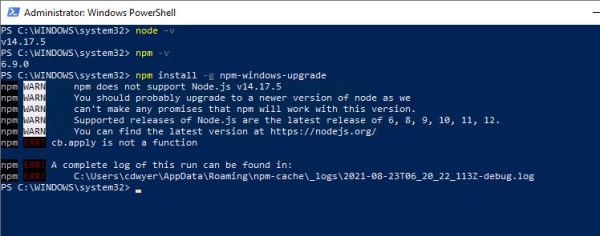
How to fix ‘npm does not support Node.js v14’ error on Windows 10

After attempting to upgrade my version of Node.js on my Windows 10 machine (directly from the Node.js LTS Windows MSI download) I was left with an install of Node.js where I couldn't use NPM. Anytime I tried to use NPM (Node Package Manager) I would get the following error npm WARN npm does not support... Continue Reading →

How to avoid downtime during blue/green deployment of service behind Azure Front Door

While Azure Front Door promises to provide resilience and automatic failure over to alternate backends, I've found it a bit tricky to determine how to eliminate downtime when doing blue/green deployments, or if you want to take a specific backend service offline to perform upgrades or maintenance. It appears I'm not the only one: load... Continue Reading →

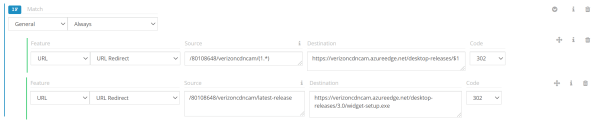
How to configure URL redirects using Verizon Premium Azure CDN

I'm writing this post not because I'm an expert in CDN configuration but because I found the process of setting up URL redirects using Azure CDN (Verizon Premium) incredibly frustrating due to poor/lack of documentation and examples. In my scenario I had an Amazon Web Services S3 (file storage) that contained installation files for different... Continue Reading →

2 tips for working with Web Project Folders, CMD Window and Visual Studio Code

With modern web development I find I'm using Visual Studio code as my IDE the majority of the time. During a recent developer bootcamp I shared the way I open projects and realised that some of the techniques I use wasn't common knowledge. With web project in Visual Studio Code (VSCode) you need to open... Continue Reading →

Using Tailwind CSS in an Angular CLI App

I was only recently introduced to the Tailwind CSS framework while putting together a sample for the Lap around the Microsoft Graph Toolkit series. I liked the simplicity of Tailwind although it took me a while to get it working in an Angular app created with the Angular CLI (V9) so I'm sharing the steps... Continue Reading →

Create a website or blog at WordPress.com

Up ↑