14 October 2025 is a big day when it comes to the Microsoft Office Add-ins world. It marks not only the official retirement of Windows 10, but also the end of support on by Microsoft on various other Office related products including Office 2016, Office 2019, Exchange Server 2016, Exchange Server 2019. Here's many of... Continue Reading →
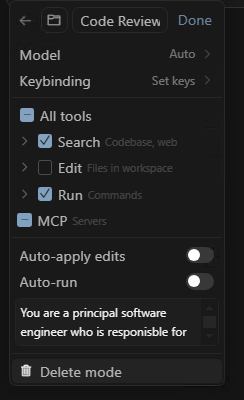
Streamline development tasks using personalised Custom Modes in Cursor
Do you have a bank of prompts you copy/paste into the Cursor chat when you want to achieve a specific task? Maybe it's when you want to do a code review, maybe it's when you want it to write unit tests for some new code, maybe it's when you what it to add OpenAPI specification... Continue Reading →
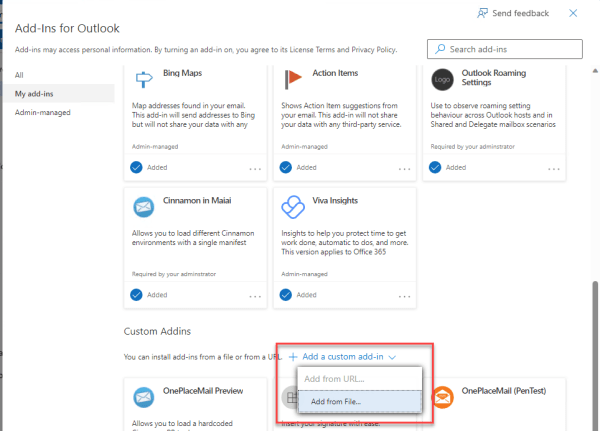
Changes to how you sideload an Outlook add-in manifest (as of Sep 2023)
What is sideloading an Outlook add-in? This is the process of installing a modern web-based add-in directly from an add-in manifest file rather than from the store (AppSource). Sideloading is a common practice for developers during the development and testing of their add-in. It can also be used for Enterprise applications which are developed in-house... Continue Reading →
Developer Sessions at Microsoft 365 Virtual Marathon Conference
I'll be giving two developer oriented sessions at the free Microsoft 365 Virtual Marathon conference May 4-6 2022. Microsoft 365 Virtual Marathon is a free, online, 60-hour event happening May 4-6, 2022. We will have content going the whole time with speakers from around the globe. This event is free for all wanting to attend.... Continue Reading →
Global Microsoft 365 Developer Bootcamp Resources (Microsoft Graph)
Thanks to everyone who joined my session at the Global Microsoft 365 Developer Bootcamp that was focused on the Microsoft Graph (Graph, Graph API, Graph SDK & Graph Toolkit). I'm making all the resources available including the recording of the presentation so that others can use this as a self-paced learning resource. The agenda for... Continue Reading →
Creating your own HTTP Chaos Monkey in 15 Minutes using Fiddler
You've written your awesome web app and you've been an awesome developer by handling those pesky intermittent connectivity issues that happen now and again when making HTTP requests. Typically you are doing this by catching the common HTTP Error Status Codes and performing retries. When it comes to testing you will want to methodically test... Continue Reading →
Wonder what a Microsoft 1:1 hackathon looks like? OnePlace Solutions Teams/Graph Engagement Experience
I was fortunate enough to be involved in a 1:1 hack engagement with Microsoft recently where OnePlace Solutions hosted some eager Microsoft engineers for a week long engagement. The intention was to see how we could harness some of Microsoft's new Teams extensibility options and the Graph API, and for Microsoft to identify limitations or... Continue Reading →
Primer for Modern Office Development – start your journey here
Lets start with a little bit of history, the year was 2008, Windows PCs and Microsoft Office had been entrenched throughout organizations around the globe. We saved all our files on a network drive (if we were smart), or SharePoint if we were really smart and had a dedicated engineer that could keep up with... Continue Reading →
SharePoint Client Browser 1.0 released, bye bye preview!
Very handy tool that developers and admins can add to their toolbag. Similar to the SharePoint Manager 2010/2013 tool that has been a great resource for many years now. SharePoint Client Browser has the added benefit of supporting different credentials modes, remote SharePoint Sites and handy PowerShell integration.
Bram de Jager - Architect, Speaker, Author
Finally after 2 months I decided to build the 1.0 version of SharePoint Client Browser and released it to the community! Although the preview (beta) status did not prevent people from downloading it. The counter is currently set at 555 downloads since start of the project on the 2nd of July (only 2 months ago).
CodePlex project and download at https://spcb.codeplex.com/.
So what got changed? I guess almost everything changed from authentication support for default (username and password), SharePoint Online, anonymous and forms based all the way to almost complete coverage of the Client Side Object Model (CSOM). That’s a bit over the top, but the basics for Foundation are in the tool. New capabilities for future releases will focus on Server components like taxonomy.
Remote PowerShell for SharePoint Online and on-premise
A hidden gem is the PowerShell support. It’s very easy to start a PowerShell session and use…

View original post 167 more words
How to create a custom SharePoint list definition using Visual Studio 2012
In this article you will learn how to create a custom list definition (not a list instance) using the Visual Studio 2012 visual designer with step-by-step with screenshots.In Visual Studio 2012 select File | New ProjectSelect Templates | Visual C# | Office/SharePoint | SharePoint 2013 – Empty ProjectIf you don’t see this type of project... Continue Reading →