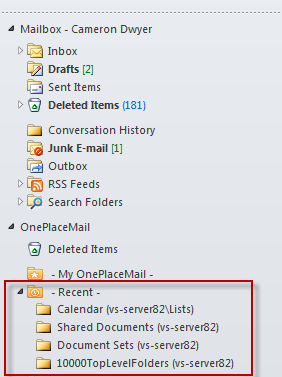
From a development perspective we were able to achieve some really nice integration with Outlook UI as part of this release. One of the highlights was the Recent Locations tracking and exposing this in the Outlook navigation pane. As you save emails/attachments using OnePlaceMail those locations are exposed as Recent Locations in the Outlook as shown below:
Clicking on these Recent Locations then provides you to see the SharePoint Location content directly within Outlook.
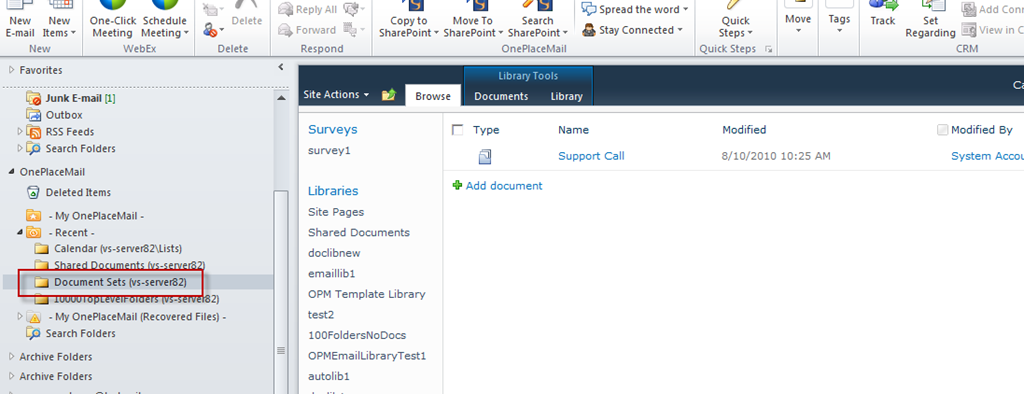
The challenge we faced in the development of this functionality was in determining the sort order of folders in Outlook 2010. For the Recent Locations functionality we would need the most recent folder at the top and for the folders to be in the order of when they were last used. Folders sort alphabetically in Outlook and in previous releases it has been possible to customize the sort order of the folders (MAPI code). Outlook 2010 removed the ability to customize the sort order using the old techniques. At the time of development we were not aware of anyone who has been able to achieve this and found several posts and articles stating it wasn’t possible in Outlook 2010. As you can see from the screenshots above, we have managed to achieve it in OnePlaceMail Release 6.1.
 Cameron Dwyer
Leave a comment